

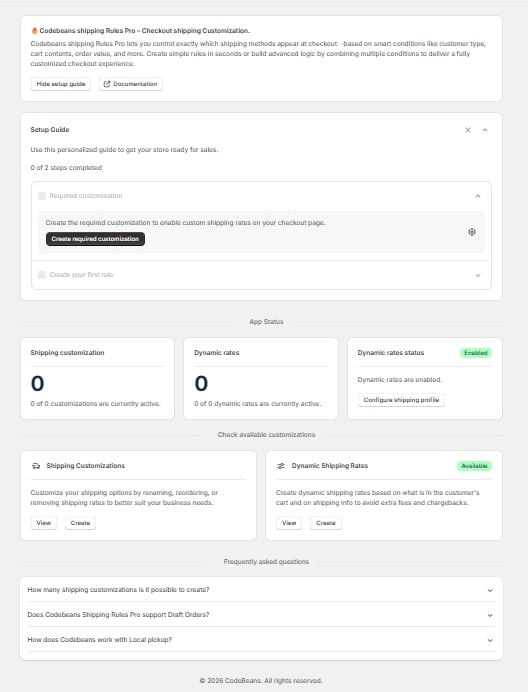
Home page — promo card, Setup Guide, App Status, FAQ
Promo card
Introduces the app and carries two buttons: Show / Hide setup guide, and Documentation (which opens the Codebeans site).Setup Guide
The two-step guide to getting your first rule live. Covered in Installing and getting set up. You can collapse or dismiss it, and bring it back from the promo card.App Status
Three cards giving you a quick read on what’s live:- Shipping customization — a count of how many of your customizations are currently active, e.g. “2 of 5 customizations are currently active.”
- Dynamic rates — the same count for dynamic rates, e.g. “1 of 3 dynamic rates are currently active.”
- Dynamic rates status — an Enabled badge, plus a Configure shipping profile button that takes you to your shipping settings in the Shopify admin.
Check available customizations
Two cards, each with View and Create buttons:- Shipping Customizations — “Customize your shipping options by renaming, reordering, or removing shipping rates to better suit your business needs.” View opens the customizations list; Create opens the rule-type picker.
- Dynamic Shipping Rates — “Create dynamic shipping rates based on what is in the customer’s cart and on shipping info to avoid extra fees and chargebacks.” View opens the Dynamic Rates tab.
FAQ
Answers to the questions merchants ask most often — how many customizations you can run at once, Draft Order support, and how the app behaves with local pickup. See Getting help if your question isn’t there.If a plan change switched any of your rules off, a banner appears at the top of this page naming them. See Choosing a plan.